RSVPs and gifts in one place
Free online invitations with RSVP and a gift list
Make one clean invitation page for your party, send a single link, and see who is coming, how many, and who has a food allergy. Add a gift list on the same page if you like. Completely free, and your guests never need an account.
Create your invitationFree forever. No credit card. Guests answer in a few taps.
Maria's birthday party
Hosted by Anna
Saturday, December 14 · 7:00 PM
Harbor Lounge
Dinner, drinks and cake. Hope you can make it!
Will you come?
- No account for guestsThey tap a link and answer. Nothing to install.
- See who is comingYes, maybe and can't come, with a headcount.
- A gift list on the same linkOptional, with reservations so nobody doubles up.
How an online invitation works
Three steps, and the second one is just pasting a link.
- 01
Create it
Add the occasion, date, time, place and a short message. Pick an icon and link a gift list if you like. It takes a couple of minutes.
- 02
Share one link
Send it through WhatsApp, Telegram, Messenger or email, or drop it into any chat. Guests open it with no account.
- 03
Watch the replies
Guests answer in a few taps and can add the event to their calendar. Every reply lands in one place, with a headcount and a food and allergies note.
Everything you need to run the guest list
RSVP in a few taps
Yes, maybe or can't come, with how many people and an optional note. You can ask for a headcount or switch it off.
Allergies and notes
Guests add a note, and Onelist gathers the ones that mention food needs in a Food and allergies panel for the menu.
Reminders and calendar
Guests who leave an email get a confirmation and an Add to calendar link (Google, Outlook, Apple). A maybe gets a reminder two days before.
Map and details
Start and end time, the place, an address you control with your own map link, and a message in your own words.
Gift lists, up to three
Link your Onelist wishlists to the invitation, for example one for each person celebrating. Guests can reserve a gift, and it is clearly just ideas.
Private by design
Hidden from search engines, and guests' email addresses are never shown, not even to you.
An invitation and a gift list on one link
Guests always ask what to bring. Most invitation sites stop at the RSVP, and most wishlists don't know about the party. In Onelist the two live together: link up to three of your wishlists to the invitation, and after a guest says yes or maybe they see the gift ideas, with a clear note that it is completely optional.
Gifts can come from any store, guests reserve what they will give so nobody doubles up, and you don't see who reserved what until after the event date. Celebrating together with someone? Link a list for each of you.
Online invitations for every kind of event
Anything with a date, a place and a guest list works.
- Birthday parties
- Baby showers
- Weddings and bridal showers
- Holiday parties
- Sweet 16
- Housewarmings, graduations and dinners
Need the gift side too? Make a free wishlist or read how to make a good one.
What Onelist invitations are not
- No card templates. You get one clean, friendly page with your icon, details and message, not a gallery of designs.
- No sending on your behalf. You share the link wherever you already talk to your guests, so you decide who gets it.
- No payments. Onelist doesn't handle money or split gifts. It helps guests choose and reserve.
Questions about online invitations
A web page for your event with the details (date, time, place, a message) and a short form where guests answer yes, maybe or can't come. You send the page's link instead of paper cards, and every answer lands in one place, so you always know who is coming.
Yes. Creating an invitation, sharing it and collecting replies is completely free: no fees, no premium tier, no credit card, and no ads on your invitation page.
No. Guests open your link, tap yes, maybe or can't come, add their name (and how many people, if you ask) and send. There is nothing to install and nothing to sign up for.
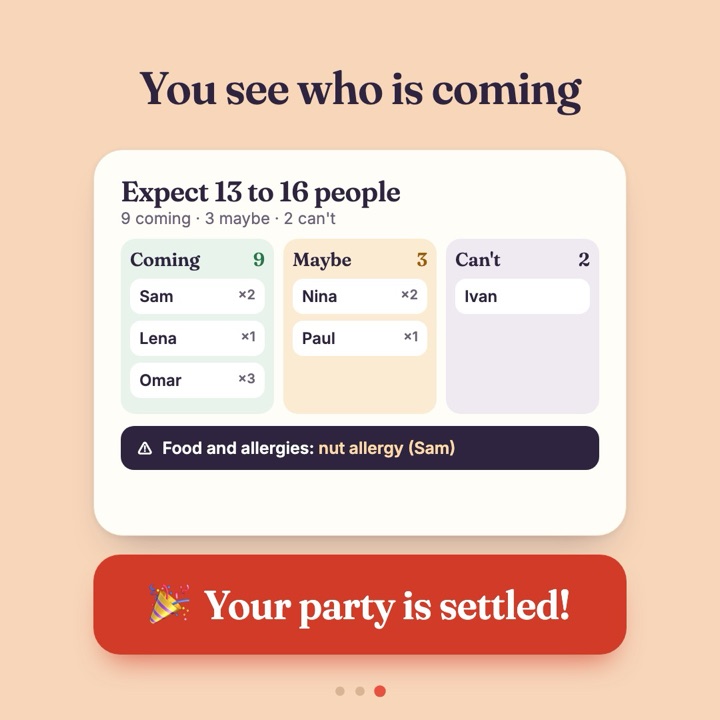
Open your invitation in Onelist. You see the replies in three columns (coming, maybe, can't come) with a headcount, the notes guests left, and a summary such as “Expect 13 to 16 people”. You can download the list as a CSV file.
Yes, and it is the main thing that sets Onelist apart. Link up to three of your Onelist wishlists, for example one for each person celebrating. Guests see them under the invitation, can reserve a gift so nobody doubles up, and it is clearly optional: “just ideas”. You can also create a new empty gift list together with the invitation.
You get one link. Copy it, or send it straight from Onelist through WhatsApp, Telegram, Messenger (on a phone) or email. Onelist does not send texts or emails to your guests for you, so you choose who gets it and how.
Yes. Edit the date, time, place, map link, message or the gift lists whenever you like. The link stays the same and guests see the new details the next time they open it. If you change the date, guests who left an email get a fresh reminder for the new day.
No. Each guest sees only their own reply. You, as the host, see everyone's.
Guests can add a note with their reply, such as “nut allergy” or “vegetarian”. Onelist groups notes that mention common food needs in a “Food and allergies” panel, so you can plan the menu.
Replies stay open until the end of the event day in your time zone. You can also set an earlier “stop taking replies on” date, or switch replies off yourself at any time. A guest who has already answered can still change their reply until the event.
A guest can leave an email after answering. They then get a confirmation with the details and an “Add to calendar” link (Google, Outlook or Apple), and a guest who answered maybe gets a reminder two days before. The host never sees guests' email addresses.
Anyone with the link can open it, so share it only with people you want to invite. Invitation pages are hidden from Google and other search engines, and guests' email addresses are never shown to anyone, not even you.
An invitation takes up to 300 replies, and one reply can cover up to 10 people. That fits a birthday party, a baby shower or a wedding-sized event.
Yes, for your gift list. Open the list and press Get QR code under the list title. Onelist makes a QR code for the list's public link, which you can download as a PNG for printing or an SVG for design tools. Guests scan it to see your gift list and reserve a gift, no account needed.
Ready to invite your guests?
Create the invitation, send the link, and let the answers come to you.
Create your invitationA wishlist for every occasion
Birthday wishlist
A birthday list anyone can add to — and reserve from.
Open 🎄Christmas wishlist
One list for the whole family, no duplicate gifts.
Open 💍Wedding wishlist
Gifts from any store, plus help beyond the registry.
Open 🎈Sweet 16 wishlist
A gift list for turning 16, with experiences and parent help.
Open