Free Sweet 16 wishlist
Sweet 16. A wishlist as good as the party.
Make a Sweet 16 wishlist with gifts from any store, and share one link with family and friends. They reserve what they will give, so you get what you want and nobody doubles up. Completely free.
Create your Sweet 16 wishlistFree forever. No credit card needed. Guests do not need an account.
Mia's Sweet 16 🎈
My birthday wishlist · party on June 6
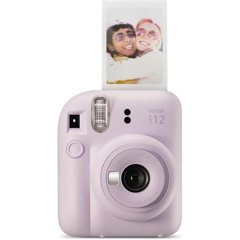 Instax Mini instant cameraAvailable
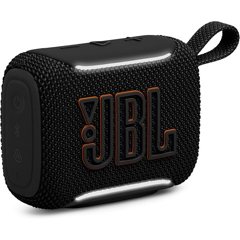 JBL portable speakerReserved
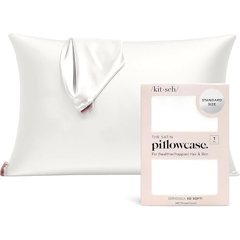 Satin pillowcaseAvailable
 Sol de Janeiro body creamAvailable
- Any store. One list.Add gifts from any store in one place.
- No duplicate giftsGuests reserve gifts, so nobody doubles up.
- The surprise staysYou never see who reserved what until after the party.
What to put on a Sweet 16 wishlist
Not sure where to start? Six ideas to build a list from. Add any of them in seconds, with a link from any store or as a wish you type.
Style and glow
- An initial necklace or studs
- A skincare or makeup set
- A bag you will actually carry
Room and chill
- LED lights or a neon sign
- A blanket hoodie
- A satin pillowcase
Music and tech
- Wireless earbuds
- A portable speaker
- A phone case and a fast charger
Photos and memories
- An instant camera and film
- Frames and photo prints
- A scrapbook or a journal
Driving age
- Driving lessons
- A phone mount and car charger
- An emergency kit for the trunk
Experiences and savings
- Concert or festival tickets
- A class: art, dance, cooking
- A savings wish for something big
Need more? See our gift ideas by age and interest.
Your Sweet 16 list, ready in minutes
Name it
Call it “Mia's Sweet 16” and set the party date.
Add your wishes
Paste a link from any store, or just type a wish, like concert tickets.
Share one link
Put it in the invitation, the family chat or on a card.
Let a parent help
Invite a parent to add gifts, prices and notes with you.
No more “what do you want?” texts
Relatives open your link, see what you picked and reserve a gift with a name and an email. No sign-up, no app. Reserved gifts are marked as taken, so the next person picks something else.
Plan it together
Press Share list and invite a parent by email. They can add gifts, fix a size or write a price range in a note. You keep the surprise: until the party date has passed, you see what is taken, but not by whom.
Six tips for a Sweet 16 wishlist people love
Share it a few weeks early
Send it with the invitation, so people can shop before the last weekend.
Mix the prices
A few small gifts, some in the middle and one or two big wishes, so everyone has a choice.
Add things that are not things
Tickets, a class or a savings wish have no link, and that is fine: just type them.
Write the details
Sizes, colors and a favorite brand go in the note under each gift.
Star your favorites
Mark the gifts you want most, so they are not the last ones left.
Thank people after the party
Once the party date has passed, you can see who reserved each gift.
Sweet 16 wishlist questions
A list of the gifts you'd love for your 16th birthday, in one place, that you can share with family and friends. Instead of everyone guessing, they open one link, pick something from your list and reserve it, so nobody gives you the same thing twice.
Yes. Creating and sharing your Onelist wishlist is completely free: no fees, no premium tier, no credit card.
A mix: small things like a hoodie or skincare, a few medium gifts such as headphones, a speaker or an instant camera, and one or two big wishes. Many people also add experiences (concert tickets, a class), things for driving once they have a permit, and a savings wish for something big. You can add a gift from any store with a link, or type a wish without one.
A few weeks before the party, ideally together with the invitation or when relatives start asking what you want. Add more gifts than you expect to receive, at different prices, so people who shop late still have choices.
No. Guests open your link, choose a gift and reserve it with their name and email, confirming the email with a one-time code. They never have to sign up for Onelist.
You see which gifts are taken, but not who took them, so the surprise stays intact. Set your party date on the list: once it has passed, Onelist shows who reserved each gift, which makes thank-you notes easy.
Yes. Press Share list and invite a parent or another adult by email. They can add, edit and remove gifts just like you, for example to add a price range or a note about sizes.
Yes. A wish does not need a link, so you can add concert tickets, a class or a savings goal as plain text. Onelist does not process payments or split a gift between guests: each gift is reserved by one person, so for a bigger wish a group of guests can agree who reserves it.
Yes. The same list works for a quinceañera, a bat mitzvah, a graduation or any other birthday. Choose the occasion when you create the list.
An Amazon list only holds Amazon products. An Onelist wishlist holds gifts from any store, plus experiences you type yourself, and guests can reserve a gift without an account, so nobody doubles up and you are not limited to one shop.